

Building a website that truly represents your brand while converting visitors into customers remains one of the biggest challenges for small and medium-sized businesses. Many entrepreneurs invest thousands in web design only to see minimal impact on their bottom line. This guide walks you through a proven, step-by-step approach to creating a custom website that enhances your branding and optimizes user experience for measurable conversion improvements. You'll learn how to define goals, plan strategically, design effectively, and maintain performance over time.
Table of Contents
- Key takeaways
- Define your website goals and audience
- Plan your website structure and content strategy
- Design your website focusing on branding and user experience
- Test, launch, and maintain your website for optimal performance
- Elevate your website with expert custom design services
- FAQ
Key Takeaways
| Point | Details |
|---|---|
| Define goals and audience | Start by clarifying what the site should achieve and who you are building it for to guide all design decisions. |
| Plan site structure | Translate your goals into a clear sitemap and content plan to improve usability and prevent random page creation. |
| One page goals brief | Use a simple one page document listing your top goals, audience, and success metrics to guide decisions. |
| Align with business objectives | Ensure your website priorities reflect broader business aims such as growth, retention, or customer education. |
Define your website goals and audience
Before touching any design tools, you need crystal-clear answers to two fundamental questions: what do you want your website to accomplish, and who are you building it for? Effective websites start with defining clear goals aligned to business objectives and understanding target user personas. Without this foundation, you're essentially designing in the dark.
Start by identifying your primary website purpose. Are you focused on brand awareness, lead generation, direct e-commerce sales, or customer education? Most businesses have multiple objectives, but one should take priority. A consulting firm might prioritize lead capture through contact forms, while an online retailer focuses on product sales. Your dominant goal shapes everything from homepage layout to navigation structure.
Next, develop detailed target audience personas. Go beyond basic demographics to understand pain points, browsing behaviors, and decision-making triggers. A persona for a busy restaurant owner looks vastly different from one targeting corporate procurement managers. Document what problems they're trying to solve, what questions they ask, and what objections prevent them from taking action. This research directly informs your content strategy and design choices.
Align these website goals with your broader business objectives. If your company aims to expand into new markets this year, your website should prominently feature case studies or testimonials from those industries. If customer retention matters more than acquisition, prioritize account portals and educational resources over aggressive lead capture. This alignment ensures your digital presence actively supports your business strategy rather than existing as a disconnected marketing asset.
Pro Tip: Create a simple one-page document that lists your top three website goals, your primary audience persona, and how success will be measured. Reference this document during every design decision to maintain focus and avoid feature creep that dilutes your core objectives.
Use these definitions to guide specific layout decisions, feature selections, and content priorities. A lead generation site needs prominent contact forms and clear value propositions above the fold. An e-commerce platform requires robust product filtering and streamlined checkout flows. When you understand exactly what you're building and who you're building it for, design decisions become dramatically simpler and more effective.
Plan your website structure and content strategy
Once you know your goals and audience, translate that knowledge into a concrete site architecture and content plan. Planning site architecture and content strategy ensures better usability and helps users find what they need quickly. This planning phase prevents the common mistake of building pages randomly as ideas occur, which creates confusing navigation and poor user experiences.
Create a comprehensive sitemap that outlines all main pages and subpages in a hierarchical structure. Start with essential pages like Home, About, Services or Products, and Contact. Then add supporting pages based on user needs and business goals. A professional services firm might need individual service pages, case studies, team bios, and a resources section. An e-commerce site requires product category pages, individual product pages, shipping information, and return policies.
| Page type | Primary purpose | Key elements |
|---|---|---|
| Homepage | Orient visitors and drive to conversion paths | Value proposition, navigation, primary CTAs |
| Service/Product pages | Educate and persuade | Benefits, features, social proof, purchase/contact CTAs |
| About page | Build trust and credibility | Story, team, values, differentiators |
| Contact page | Facilitate communication | Forms, phone, email, location, hours |
Prioritize content that directly addresses user needs and supports your conversion goals. Every page should answer specific questions your target audience asks. If you're targeting small business owners concerned about website costs, create content that transparently explains pricing models and demonstrates ROI. If your audience struggles with technical implementation, provide clear guides and support resources. Content that fails to serve user needs or advance business objectives wastes valuable screen space and attention.
Organize navigation menus with ruthless simplicity. Most websites need no more than five to seven main menu items. Group related pages under logical categories using clear, jargon-free labels. Visitors should understand exactly where each menu item leads without guessing. Avoid clever marketing language in navigation; "Solutions" confuses people, while "Services" communicates clearly. Include a search function if your site has more than 20 pages.
Develop a content calendar and gather all necessary assets before design begins. List every page, the word count needed, required images or videos, and who's responsible for creation. This prevents the frustrating scenario where your beautiful new site sits 80% complete because you're still waiting for product descriptions or team photos. Professional website planning includes content preparation as a critical milestone, not an afterthought.
Design your website focusing on branding and user experience
With structure and content planned, you can focus on the visual and functional design that brings your brand to life while optimizing for user actions. Custom website design that balances branding and user experience significantly increases conversion rates. This phase requires equal attention to aesthetic appeal and practical usability.

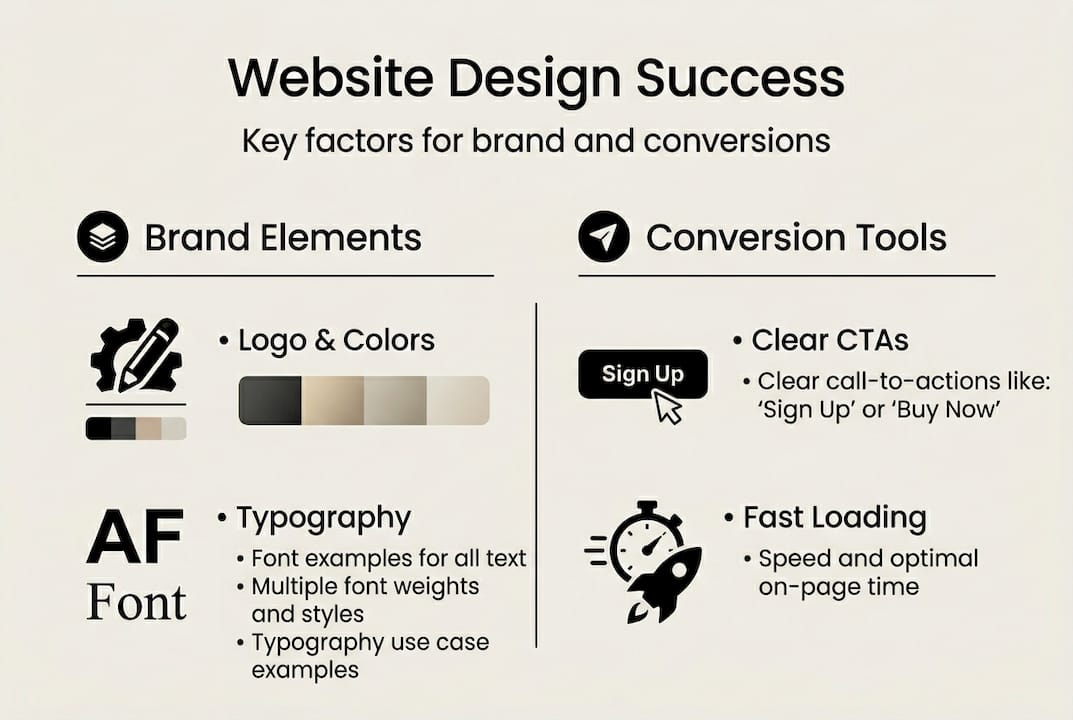
Choose color schemes, typography, and imagery that consistently reflect your brand identity across every page. Your website should feel like a natural extension of your business cards, proposals, and physical spaces. Select two to three primary brand colors and use them strategically to guide attention and create visual hierarchy. Typography choices communicate personality; a law firm benefits from traditional serif fonts that convey authority, while a creative agency might use modern sans-serif typefaces that feel innovative.
| Design element | Branding impact | UX consideration |
|---|---|---|
| Color palette | Reinforces brand recognition and emotional tone | Ensure sufficient contrast for readability |
| Typography | Communicates brand personality and professionalism | Prioritize legibility across all device sizes |
| Imagery | Shows authenticity and connects emotionally | Optimize file sizes for fast loading |
| White space | Creates breathing room and premium feel | Prevents overwhelming users with information |
Ensure mobile responsiveness from the start, not as an afterthought. Over 60% of web traffic now comes from mobile devices, and search engines penalize sites that don't perform well on smartphones. Design with a mobile-first mindset, then enhance for larger screens. Test every page on actual phones and tablets, not just browser simulation tools. Pay special attention to touch targets; buttons and links need adequate spacing for finger taps, not just mouse clicks.
Design clear, compelling calls-to-action that guide users toward your conversion goals. Every page should have an obvious next step. Use action-oriented language that creates urgency without feeling pushy. "Schedule your free consultation" outperforms generic "Contact us" buttons. Place primary CTAs above the fold and repeat them strategically throughout longer pages. Use contrasting colors that make CTAs visually prominent without clashing with your overall design aesthetic.
Balance visual appeal with intuitive navigation and accessibility standards. Beautiful design means nothing if users can't find what they need or if visitors with disabilities can't access your content. Include descriptive alt text for all images, ensure keyboard navigation works smoothly, and maintain sufficient color contrast ratios. Use heading tags (H1, H2, H3) properly to create logical content structure that both users and search engines understand.
Pro Tip: Create a simple style guide that documents your exact color codes, font choices, button styles, and spacing standards. This ensures consistency across all pages and makes future updates much easier, especially if multiple people contribute to your site over time.
Prioritize fast loading speeds as a non-negotiable design requirement. Compress images without sacrificing quality, minimize unnecessary animations, and choose a reliable hosting provider. Users abandon sites that take more than three seconds to load, and search engines actively penalize slow websites in rankings. Professional custom website design solutions optimize performance alongside visual design, recognizing that speed directly impacts both user experience and conversion rates.
Test, launch, and maintain your website for optimal performance
Even the most beautifully designed website fails if it doesn't work properly or degrades over time. Regular testing and maintenance are critical to sustain website performance and effective user engagement. This verification phase protects your investment and ensures visitors have consistently positive experiences.
Conduct comprehensive usability testing across multiple devices and browsers before launch. Test on actual iPhones, Android phones, iPads, Windows laptops, and Macs, not just emulators. Check Chrome, Safari, Firefox, and Edge browsers. Click every link, submit every form, and attempt every user action you expect visitors to take. Have colleagues or friends unfamiliar with your site attempt common tasks while you observe where they struggle or get confused.
Set up analytics tools immediately to monitor traffic patterns and conversion performance. Google Analytics provides free, powerful insights into how visitors find your site, which pages they view, how long they stay, and where they exit. Configure goal tracking for your key conversion actions, whether that's form submissions, phone calls, purchases, or content downloads. Review this data monthly to identify what's working and what needs improvement.
"The best website is never finished. It evolves based on user behavior data and changing business needs. Regular optimization based on real performance metrics consistently outperforms set-it-and-forget-it approaches."
Fix broken links, update content regularly, and optimize loading times as ongoing maintenance tasks. Broken links frustrate users and damage search engine rankings. Use automated tools to scan for broken links monthly and fix them immediately. Update outdated information, refresh old blog posts with current data, and add new content that addresses emerging customer questions. Monitor page speed quarterly and optimize images or code that slow performance.
Use customer feedback to drive continuous user experience improvements. Add a simple feedback mechanism that lets visitors report problems or suggest improvements. Pay attention to support questions and complaints; they reveal friction points in your user experience. If multiple customers ask the same question, add that information prominently to your site. If people struggle with a particular process, redesign it for simplicity.
- Run A/B tests on headlines, CTAs, and page layouts to identify what drives better conversions
- Update security patches and software immediately to protect against vulnerabilities
- Back up your entire website weekly to prevent catastrophic data loss
- Review and refresh your content strategy quarterly to stay relevant
- Monitor competitor websites for industry trends and new best practices
Schedule quarterly reviews where you systematically evaluate every aspect of your website against your original goals. Are you achieving the conversion rates you targeted? Has your audience or business focus shifted in ways that require site updates? Technology and user expectations evolve rapidly; websites that looked modern two years ago often feel dated today. Plan for periodic refreshes every 18 to 24 months to maintain a competitive edge.
Elevate your website with expert custom design services
While this guide provides a solid foundation for designing an effective website, many business owners find that partnering with experienced professionals accelerates results and ensures nothing gets overlooked. Professional designers bring specialized expertise in translating brand identity into compelling visual experiences while optimizing every element for conversion performance.
Custom web design services tailored specifically for small and medium-sized businesses combine strategic planning, modern aesthetics, and conversion-focused functionality. Rather than wrestling with technical challenges or second-guessing design decisions, you can focus on running your business while experts build a digital platform that drives measurable results. The right partnership doesn't just deliver a website; it creates an ongoing revenue-generating asset that evolves with your business needs and market opportunities.
FAQ
How long does it take to design a website?
Website design timelines typically range from four to twelve weeks depending on complexity and scope. A simple five-page brochure site with straightforward content might be completed in four to six weeks. More complex sites with custom functionality, e-commerce capabilities, or extensive content requirements often need eight to twelve weeks. The timeline also depends heavily on how quickly you can provide content, feedback, and approvals during the design process.
What is the difference between custom design and templates?
Custom design creates a completely unique website built specifically for your brand, audience, and business goals. Every element is crafted to reflect your identity and support your conversion objectives. Templates offer pre-made designs that you customize with your own content and colors, which saves time and money but limits differentiation. Templates work well for very small businesses with tight budgets, while custom design better serves businesses that compete on brand experience and need to stand out in crowded markets.
How can I improve my website's conversion rate?
Focus on five key areas to boost conversions: clarify your value proposition so visitors immediately understand what you offer and why it matters, simplify navigation to reduce friction in the user journey, create compelling calls-to-action with specific action-oriented language, optimize page loading speed since slow sites lose visitors before they convert, and use social proof like testimonials and case studies to build trust. Test changes systematically using A/B testing rather than making multiple changes simultaneously, so you can identify what actually drives improvement.
Do I need a professional designer or can I build it myself?
You can build a functional website yourself using platforms like WordPress, Squarespace, or Wix, especially if you have some technical aptitude and design sense. This approach works well for very small businesses with limited budgets and simple needs. However, professional designers bring expertise in user experience optimization, conversion psychology, technical implementation, and brand strategy that's difficult to replicate without years of experience. Consider your opportunity cost; the time you spend learning design tools and troubleshooting technical issues is time away from revenue-generating activities in your core business.
How much should I budget for a professional website?
Professional custom website costs vary widely based on complexity, typically ranging from $5,000 to $50,000 for small to medium-sized business sites. A basic custom site with five to ten pages and standard functionality might cost $5,000 to $15,000. More complex sites with custom features, e-commerce capabilities, or extensive content development often range from $15,000 to $50,000. Ongoing maintenance and hosting add $100 to $500 monthly depending on your needs. View this as an investment in a revenue-generating asset rather than an expense; a well-designed website that increases conversion rates by even 2% typically pays for itself within months.