

Websites with fewer than 10 elements convert 2.17 times better than those with 40 or more. That single statistic challenges everything most business owners believe about web design. The instinct to add more features, more images, and more calls to action actually undermines the goal of engaging visitors and driving conversions. Minimalist web design flips this approach by focusing exclusively on what matters, eliminating distractions, and creating a clear path for users to take action. This strategic simplicity delivers faster load times, higher engagement, and measurably better business outcomes.
Table of Contents
- Key takeaways
- Understanding minimalist web design: definition and core principles
- Evidence-based benefits of minimalist web design for user experience and business outcomes
- Balancing minimalism with brand and SEO considerations
- Applying minimalist web design: practical steps for designers and marketers
- Explore professional minimalist web design services
- Frequently asked questions
Key Takeaways
| Point | Details |
|---|---|
| What minimalist design is | Minimalist web design prioritizes essential elements and removes nonfunctional components to reduce cognitive load and help users complete their actions. |
| Faster loads and conversions | Minimalist pages load significantly faster and show higher conversion rates compared to cluttered designs. |
| One action per page | Identify the single most important action on each page and design all other elements to support that goal. |
| Core design principles | Principles include simple visual hierarchy, clear messaging, functional elements over decoration, ample white space, and restrained color. |
| Evidence of impact | Minimalist designs deliver higher conversion rates greater engagement and faster load times backed by measurable data. |
Understanding minimalist web design: definition and core principles
Minimalist web design is a strategic approach that prioritizes essential elements, stripping away non-functional components to reduce cognitive load, enhance user focus, and improve usability. This isn't about creating bare or sterile websites. It's about deliberate choices that serve specific user goals without distraction.
The human brain processes visual information rapidly, but every additional element competes for attention. When you visit a website cluttered with pop-ups, sidebars, and competing messages, your brain works harder to identify what matters. This cognitive load exhausts users and drives them away. Minimalist design eliminates this friction by presenting only what users need to complete their intended action, whether that's reading content, making a purchase, or contacting a business.
Core principles guide effective minimalist design:
- Simplicity in visual hierarchy guides users naturally through content without confusion
- Clarity in messaging ensures every word and image serves a specific purpose
- Functionality over decoration means every element must justify its presence through utility
- Strategic use of white space creates breathing room that improves comprehension and focus
- Restrained color palettes direct attention to priority elements without visual noise
This contrasts sharply with traditional complex design, which often adds features because they're available rather than necessary. A cluttered homepage might include animated sliders, multiple navigation menus, social media feeds, testimonial carousels, and competing calls to action. Each addition fragments user attention and increases the likelihood they'll leave without converting.
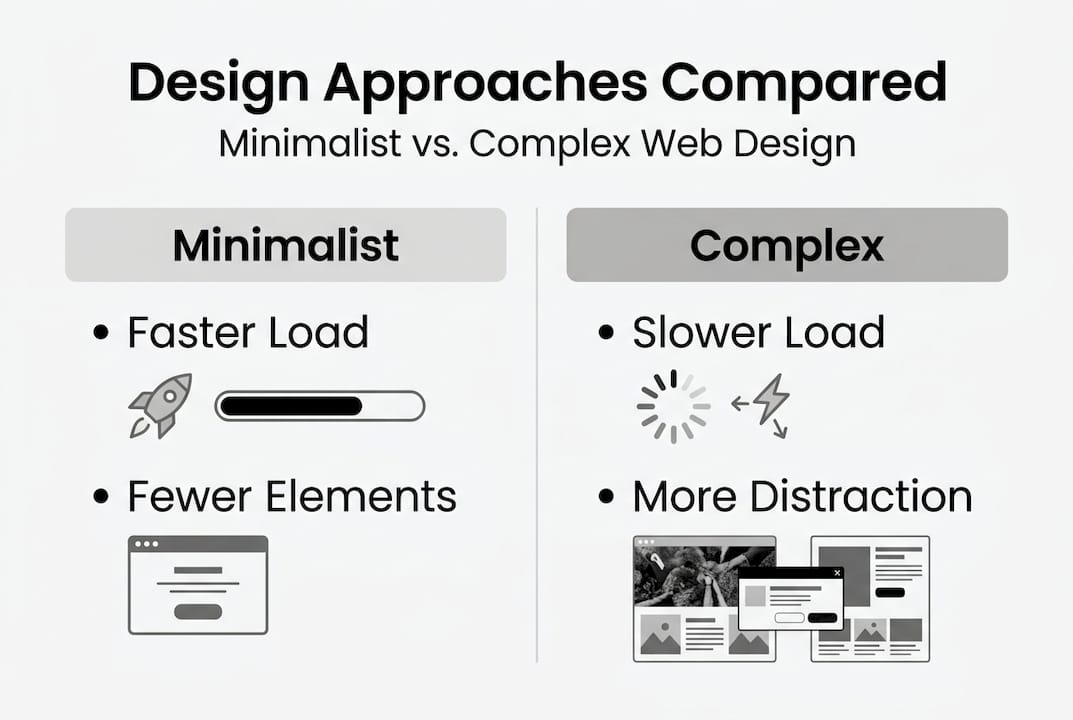
Minimalist design recognizes that less truly becomes more when every remaining element works harder. Typography becomes a primary design tool, with careful selection of typefaces, sizes, and spacing creating visual interest without additional graphics. White space isn't empty, it's a design element that frames content and creates visual flow. Color choices become more impactful when limited to two or three strategic hues that reinforce brand identity and guide user action.
Pro Tip: Start by identifying the single most important action you want users to take on each page, then design everything else to support that goal. If an element doesn't directly contribute to that primary objective, question whether it belongs on the page at all.
Evidence-based benefits of minimalist web design for user experience and business outcomes
The performance advantages of minimalist design aren't theoretical. Minimalist sites show 20-30% higher conversion rates, with load times of 1.2 seconds compared to 3.8 seconds for complex sites. Pages with fewer than 10 elements achieve 2.17 times higher conversions than those with 40 or more elements, and engagement increases by up to 67% when users can focus on essential content without distraction.
Page load time directly impacts both user experience and business metrics. Every additional second of load time reduces conversions by approximately 7%. When minimalist sites load in 1.2 seconds versus 3.8 seconds for complex alternatives, that 2.6-second difference translates to roughly 18% better conversion performance from speed alone. The reduction in HTTP requests, smaller file sizes, and streamlined code that characterize minimalist design create this speed advantage naturally.

Element count affects conversion rates through a clear mechanism: decision fatigue. When users face 40 or more elements on a page, they must process and evaluate each one, consuming mental energy that could drive action. Landing pages with fewer than 10 elements achieve a 3.25% conversion rate compared to 1.5% for cluttered pages. This 117% improvement comes from eliminating choice paralysis and creating a clear path to conversion.
Cognitive load reduction measures quantitatively through NASA-TLX scores, which assess mental demand, physical demand, temporal demand, performance, effort, and frustration. Minimalist sites consistently score lower on cognitive load metrics than complex alternatives, meaning users expend less mental effort to accomplish their goals. This reduced effort translates directly to higher satisfaction and increased likelihood of completing desired actions.
| Design approach | Average load time | Conversion rate | Engagement increase | Element count |
|---|---|---|---|---|
| Minimalist | 1.2 seconds | 3.25% | 67% higher | <10 elements |
| Complex | 3.8 seconds | 1.5% | Baseline | 40+ elements |
| Performance gap | 2.6s faster | 117% better | Significant | 4x reduction |
These metrics demonstrate that minimalist design isn't a stylistic preference but a performance optimization strategy. The data shows consistent patterns across industries and user segments, with mobile users benefiting even more dramatically from simplified designs that load quickly and present clearly on smaller screens.
Balancing minimalism with brand and SEO considerations
Minimalist design creates tension between simplicity and the need to communicate brand personality while maintaining search engine visibility. Digital marketers and business owners should prioritize conversions and user experience especially for mobile and first-time users, employ A/B testing, add SEO metadata invisibly, and enrich brand experience where needed, particularly for high-trust sectors like finance or healthcare.
Brand dilution represents a legitimate concern when simplifying design. Luxury brands, creative agencies, and businesses that compete on emotional connection need visual richness to convey their value proposition. The solution isn't abandoning minimalism but applying it strategically. A luxury watch brand might use a minimalist layout with expansive white space and limited navigation, while incorporating high-quality product photography and sophisticated typography that communicate premium positioning.
SEO requirements don't conflict with minimalist design when you understand that search engines prioritize content quality and technical performance over visual complexity. Meta titles, descriptions, header tags, alt text, and structured data exist in code rather than visible design. You can create a visually simple page while including comprehensive SEO elements that users never see but search engines reward. Fast load times and mobile responsiveness, both strengths of minimalist design, directly improve search rankings.
A/B testing resolves uncertainty about how much simplification works for your specific audience. Test a minimalist homepage variant against your current design, measuring conversion rate, time on page, bounce rate, and goal completions. Many businesses discover that removing elements they considered essential actually improves performance. Others find that certain trust signals like security badges, testimonials, or industry certifications need prominent placement despite adding visual elements.
Mobile users and first-time visitors benefit most from minimalist approaches because they have the least context and patience. A returning customer familiar with your brand might navigate a complex site successfully, but a mobile user discovering you through search needs immediate clarity. Prioritizing these high-value segments often means simplifying primary pages while allowing more complexity in secondary sections accessed by engaged users.
Pro Tip: Create a two-tier design system where landing pages, homepages, and primary conversion pages follow strict minimalist principles with fewer than 10 key elements, while secondary pages like detailed product specifications, company history, or resource libraries can include more comprehensive content for users actively seeking depth.
Applying minimalist web design: practical steps for designers and marketers
Minimalist design focuses on essential elements and simplicity, which can be applied through deliberate element reduction, prioritization, and clarity to improve usability and conversions. Implementing this approach requires systematic evaluation of existing design and intentional choices about what stays, what goes, and how remaining elements work together.
Follow these steps to implement minimalist design effectively:
-
Audit your current design by cataloging every element on key pages: navigation items, images, text blocks, forms, buttons, widgets, and decorative elements. Create a spreadsheet listing each element and its intended purpose.
-
Prioritize elements based on user goals by identifying the primary action users should take on each page. Rank every element by how directly it supports that primary goal, marking anything that doesn't clearly contribute.
-
Eliminate non-essential elements ruthlessly, starting with purely decorative items that don't communicate information or guide action. Remove redundant navigation, excessive social media buttons, and features that seemed good in theory but analytics show users ignore.
-
Consolidate related elements to reduce visual complexity without losing functionality. Combine multiple calls to action into a single, clear button. Merge overlapping navigation categories. Simplify forms by removing optional fields.
-
Design for clarity using white space strategically to frame content and create visual hierarchy. Increase spacing between sections so users can process information in digestible chunks. Use typography variations like size, weight, and color to establish importance without adding graphic elements.
-
Test performance impact by implementing changes gradually and measuring results. Track conversion rates, engagement metrics, and user feedback to validate that simplification improves rather than harms performance.
Content prioritization determines which information deserves prominent placement. Map your user's journey from arrival to conversion, identifying the questions they need answered at each stage. A software company's homepage might prioritize explaining what the product does, showing a quick demo, and providing a clear trial signup. Everything else, including detailed pricing, comprehensive feature lists, and company background, can move to secondary pages accessed through minimal navigation.
White space functions as an active design element rather than empty area. Generous margins around headlines make them more impactful. Space between paragraphs improves readability. Padding around buttons makes them easier to click and visually prominent without increasing size or adding effects. The luxury of space communicates quality and confidence, suggesting your content is valuable enough to deserve room to breathe.
Typography becomes your primary design tool in minimalist layouts. Choose one or two typefaces maximum, using size, weight, and spacing to create hierarchy. A bold, large headline immediately communicates importance. Body text in a comfortable reading size with adequate line spacing ensures comprehension. Subtle color variations can distinguish different content types without introducing visual noise.
| Implementation aspect | Minimalist approach | Complex approach | Impact on conversions |
|---|---|---|---|
| Element count | <10 key elements | 40+ elements | 117% improvement |
| White space | 40-60% of layout | 15-25% of layout | Improved focus |
| Color palette | 2-3 strategic colors | 6+ colors | Clearer hierarchy |
| Typography | 1-2 typeface families | 3+ typefaces | Better readability |
Pro Tip: Aim for fewer than 10 key elements on landing pages and conversion-focused pages to maximize impact. This constraint forces prioritization and ensures every element earns its place through demonstrated value rather than assumed importance.
Explore professional minimalist web design services
Implementing minimalist design principles effectively requires both strategic thinking and technical expertise. While the concepts are straightforward, executing them in ways that maintain brand identity, support business goals, and deliver measurable results demands experience.
I specialize in building custom websites that combine minimalist design principles with conversion-focused user experience. My approach starts with understanding your specific business objectives and user needs, then creates streamlined digital experiences that eliminate distractions and guide visitors toward action. Every project balances simplicity with the unique elements that make your brand distinctive.
Many clients discover that minimalist design doesn't mean sacrificing personality or depth. It means being intentional about every element and ensuring your website works as a business tool rather than just a digital brochure. Whether you're launching a new site or optimizing an existing one, professional guidance accelerates results and avoids common pitfalls.
Explore my web design services to see how minimalist principles can transform your online presence into a conversion-generating asset.
Frequently asked questions
What exactly is minimalist web design?
Minimalist web design is a strategic approach that includes only essential elements needed to achieve specific user goals, deliberately removing anything that doesn't directly support those objectives. It reduces cognitive load by eliminating visual clutter and decision fatigue, making it easier for visitors to understand your message and take action. This isn't about creating bare or boring websites but about intentional design where every element justifies its presence through clear utility.
How does minimalist design affect website speed?
Minimalist sites load significantly faster because they include fewer HTTP requests, smaller file sizes, and streamlined code. Data shows minimalist sites average 1.2-second load times compared to 3.8 seconds for complex designs. This speed advantage directly improves user experience and conversion rates, since every additional second of load time reduces conversions by approximately 7%. Faster sites also rank better in search results, creating compound benefits.
Does minimalist design work for all industries?
Minimalist design principles apply across industries but implementation varies based on specific needs. E-commerce sites benefit from simplified product pages that reduce decision paralysis. Professional services firms use minimalism to communicate expertise and build trust. Creative agencies might incorporate more visual richness while maintaining clean layouts. High-trust sectors like finance or healthcare may need additional credibility elements, but the core principle of prioritizing essential information over decoration remains valuable everywhere.
What are common mistakes when implementing minimalist design?
The biggest mistake is removing elements without understanding their function, potentially eliminating important trust signals or navigation that users need. Another error is creating designs so sparse they fail to communicate brand personality or provide adequate information. Some designers confuse minimalism with removing all visual interest, resulting in boring rather than focused experiences. Successful minimalist design requires testing and iteration to find the right balance for your specific audience and goals.
How do I start simplifying my existing website?
Begin by auditing your current design and cataloging every element on key pages. Identify the single most important action users should take on each page, then evaluate whether every element supports that goal. Start removing or consolidating elements that don't contribute directly to user objectives, beginning with purely decorative items. Implement changes gradually and measure impact on conversion rates and engagement metrics. Focus first on landing pages and homepage where first impressions matter most, then extend minimalist principles to other sections based on results.